


TR-x0x inspired drum sequencer in 1U or 1U/3U
Description | Features | User Manual | Order online | On ModularGrid
Introduction
Tubbutec Drummertime is a TR-x0x-inspired step sequencer for drums.
It is available in different Eurorack form factors, features large, tactile buttons, and has many powerful features.
Drummertime is optimized for live performance and allows quick programming and editing of drum patterns.
Big sibling of 6equencer.

Features
- Step based drum sequencer with 8 instruments inspired by TR-x0x drum machines.
- Compatible with analogue and midi based systems
- 16 patterns, chainable in song mode, up to 32 patterns in a song
- Forward, backward, ping-pong and random play directions for patterns and songs
- Mute instruments live
- Probability control of steps
- Swing with adjustable amount
- Various types of Flam or Ratchet effects
- Record steps by tapping or via midi
- Clear steps while playing
- Pattern length can be set individually (Last Step)
- Copy, Paste and Clear patterns in song mode
- 8 trigger outputs with adjustable trigger length, midi out
- Analogue clock or midi clock input with adjustable clock divider
- A built in clock generator with 1 BPM resolution tempo adjustment and tap-tempo functionality.
- Multiple Drummertimes can be chained to achieve longer sequences or more instruments.
- Trigger and record via midi in, doubles as midi interface
- Trigger midi instruments via midi out
- Available in two versions: 1U 74HP, or 1U 60HP + 3U 4HP. Fits into the 62HP Palette Case
- For a detailed list and explanation of features, please refer to the user manual (PDF), which is also included with Drummertime.
- MIDI note assignment can be configured via the Drummertime configurator tool
- Firmware update is possible via midi sysex


User interface
The Drummertime user interface features 16 buttons with LEDs and a FUNC button.
Each LED can be red, blue or purple.
Typically a blue LED will indicate a mode or setting, while a red LED will indicate an active step or parameter.
When both, red and blue LEDs are turned on, the resulting color will be purple. This means both are set (e.g. a step is set and a parameter is selected).
Drummertime comes in two versions:
- A single-module 1U, 74HP version
- A two-module version: 1U,60HP and 3U,4HP. Here, the 1U part contains the 16 illuminated buttons. The 3U part contains the FUNC button and the inputs and outputs
There are also two button versions:
- Tactile: A tactile button with a bit of haptical feedback and a roughly defined pressure point.
- Clicky: A clearly defined pressure point with an audible click.

Inputs and Outputs
Drummertime has 8 instrument outputs that can output triggers or gates.
The sequencer can be clocked via analogue clock or MIDI clock.
The clock input doubles as a MIDI input, the RESET or RUN/STOP input doubles as MIDI output.
If the internal clock generator is used, the clock input turns into an output. This way other gear can be clocked via analog clock, or MIDI clock.
It is possible to trigger analogue drum modules, analogue drum machines or midi based drum machines.
The 6m0d6 module can be connected using the LINK connector on the back of the module.

Drum patterns and songs
Multiple patterns can be chained to a ‘song’. Each song consists of up to 32 patterns, a single pattern can occur multiple times in a song.
You can record a new song while another is playing and start the new song in sync. This allows very flexible and intuitive live performances.

Performance features
Many features exist to ease pattern programming and live performance:
Changing the direction will not cause Drummertime to lose sync as it remembers the “original” play position.
Play directions are:
- Forward
- Backward
- Ping-Pong
- ‘Smart’-random
These play directions can also be applied to the song.

A handy performance tool is the MUTE mode. Here you can activate and deactivate instruments while the sequencer is playing and without modifying the patterns.
Furthermore, the Low Tom and High Tom instruments can be used to control the probability of other instruments playing.

While the sequencer is running, TAP mode can be used to record steps live. Here the instrument buttons can be used to enter rhythms.
In CLEAR mode, the current steps are cleared as long as CLEAR is pressed.


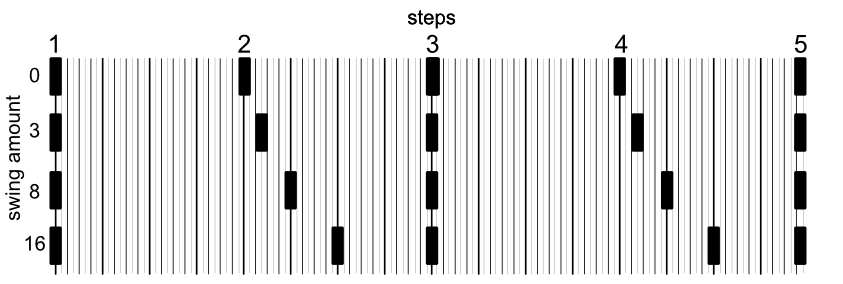
Swing
When swing is activated, every second step is delayed by a time proportional to the step length. Fifteen swing amounts are possible ranging from 1/32th to 16/32th.
The maximum setting of 16 results in a 3-to-1 rhythm, a setting of 8 in a 5-to-3 rhythm.
You can use one of the trigger outputs to clock other gear, effectively converting a straight clock into a ‘swung’ clock.
Ratchet and Flam
Multiple flam types are available. Three of them create subdivisions of a single step, and four span multiple steps.
The effect is triggered by an instrument channel and is affected by mute and probability. This can create sequences with flams or triplets inserted randomly.

Link multiple Drummertimes
Multiple Drummertime or 6equencer modules can be connected to form patterns with more than 16 steps or used in parallel to effectively get more instrument channels.
Up to 4 6equencers / Drummertimes can be connected for a maximum of 64 steps per pattern or 32 instrument channels. The connection is achieved via a ‘LINK’ connector on the back of the module.


Config Menu
You can define
- Midi input and output channels
- Pulse lengths or gate output
- Accented pulse length
- Clock mode (analog, MIDI, generator)
- The clock generator
- Clock dividers
- LED brightness
- LINK mode
- Analog clock divider
- Swing amount
It is rarely necessary to change settings in the config menu, but to ease its use, a reference card is provided.

User Manual
For a detailed list and explanation of features, please refer to the user manual (PDF), which is also included with Drummertime.
There also is a clock source quick start guide (PDF)