
With the web-based TR-8oh8 configurator you can define the MIDI note numbers for the instruments, and update the firmware.
How to check your firmware version:
- Put the MODE selector to CONFIG
- Put the INSTRUMENT/TRACK selector to 12 VARIOUS
- Press STEP 16 and hold it
- LEDs will light up indicating the firmware version in binary
How to update:
- Connect MIDI out from your computer to MIDI in of the TR-8oh8
- In the configurator, set up your MIDI output accordingly. Your browser needs to support WebMIDI. If it does not, you can also send the firmware using an external Sysex programm (described below).
- Go to the FIRMWARE UPDATE tap.
- Load the .ebi firmware file
- In order to get the TR-8oh8 into the bootloader, perform the following steps:
- Turn off the TR-808
- Press and hold the FUNCTION button (the red button)
- Turn on the TR-808
- You have sucessfully entered the bootloader when you see LEDs 1 is turned on.
- Press “Start firmware update”
- You should see LED 1 start blinking. Progress is shown by a LED bargraph
- When the firmware update is complete, the firmware starts
Firmwares
Currently, there are no firmware updates
Update using Sysex Tools
If your browser does not support WebMIDI, or if you want to update your TR-8oh8 offline, you can save the update as a sysex file and send it to the TR-8oh8 using MIDIOX or SysexLibrarian. In order to do that, press the “Save as Sysex” button in the updater tool.
Update Using MidiOX
Enter the Bootloader mode on TR-8oh8 as described above.
- Open MidiOX and select the correct midi output via Options -> MIDI Devices
- Go to View -> SysEx
- enter the configuration Sysex -> Configure. Activate “Delay after F7” and set it to 100.
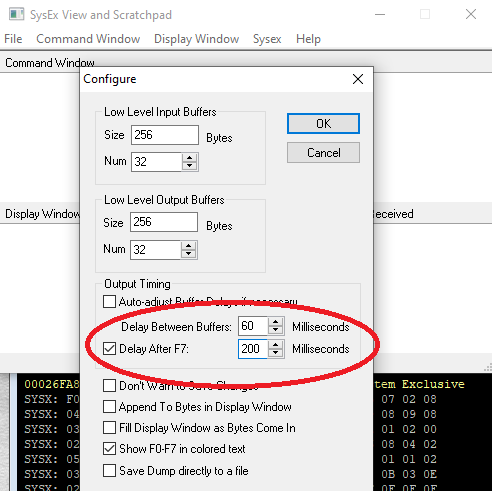
- Open and send the firmware update file File->Send SysEx File. Use the file with .syx extension.
- Wait until the update is finished. You should see LED 1 start blinking. Progress is shown by a LED bargraph
- When the update is complete, the new firmware will start.
Update Using Sysex Librarian
- Enter the Bootloader mode on 6equencer as described above.
- Download Syex Librarian from and install it.
- Open the firmware syses file with .syx extension
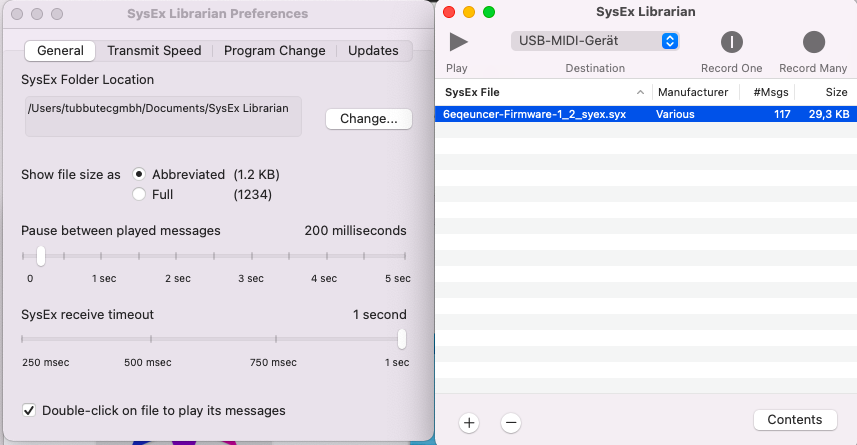
- Go to Sysex librarian – Preferences and set “Pause between played messages” to about 100 (anything larger than 100 is fine, too)
- Select the correct midi interface, connect it to TR-8oh8 MIDI-in
- Press play
- Wait until the update is finished. You should see LED 1 start blinking. Progress is shown by a LED bargraph
- When the update is complete, the new firmware will start.