

This page is not finished yet, but already provides a lot of info about the upcoming TR-8oh8 upgrade.
There is also an almost finished user guide.
You can get on a notification list here.
Midi interface and upgrade for the Roland TR-808
Features | User manuals | Order Online | Configurator and updater
Introduction
TR-8oh8 is a CPU upgrade and MIDI interface for the Roland TR-808. It adds an improved sequencer, additional instruments, live performance features and MIDI input and output.
Features
- Replacement processor for Roland TR-808 with extended features
- 11 additional drum sounds including a tunable cowbell and adjustable clap
- Dynamic levels for almost all instruments
- MIDI input and output
- Improved sequencer, but true to the original:
- Change patterns and program them at any time without having to stop
- Edit patterns while another one is playing
- 128 patterns, arranged in 4 pattern banks
- 12 tracks can be saved and recalled at any time
- A new track can be programmed on the fly
- Four dynamic levels per step and instrument
- And/or four probability levels per step and instrument
- Per-step pitch sequencing of Cowbell 2 and Grainstrument (See below)
- Copy, paste and clear patterns easily
- Tap recording and 606-style clear
- Twelve Tools and effects:
- Instrument muting
- Beat reslicer
- Arpeggiator (live drum sequencer)
- Ratchet / Flam with 13 different modes
- Grains tool – Turn your 808 into a bassline synth
- A pattern generator with twelve different styles
- Adjust Clap sound parameters and Cowbell pitch
- Play directions (forward, backward, ping-pong, random)
- Swing with adjustable amount
- Shift, copy and paste instrument tracks
- Cymbal and open hihat decay control via MIDI
- Retain patterns even without battery
- Built-in configuration menu to quickly set many additional parameters
- Easy to install, no case drilling needed
- MIDI note config and Firmware update via MIDI sysex
[Picture coming soon]
MIDI input and output
TR-8oh8 features both MIDI input and output. The input can be used to sync the TR-808 to MIDI clock, and to trigger the instruments with velocity control. You can also use CC messages to control all kinds of parameters.
The output sends clock, the instruments sequenced by the TR-808, and allows control of other gear, or recording of sequences in a DAW.
The MIDI notes of the instruments are freely configurable using a web-based tool.
There are multiple ways to install MIDI sockets, but for none of these drilling of additional holes is needed.
It is possible to repurpose the existing DIN socket to function as both, DIN-sync and MIDI. It is also possible to repurpose the PEDAL SW sockets, adapters are included in the kit.
Additional instruments
With 8oh8, it is possible to access additional instruments in the sequencer or via MIDI. These instruments are using the original 808 sound circuits, but trigger them in new ways. These are:
- BD2 – BD2: An alternative kick
- SD2 – Snappy snare
- LT2 – Closed Snare
- HT2 – Maracas. Trigger maracas, even when the switch is set to Clap.
- RS2 – Muted claves / muted rim shot
- CP2 – A freely configurable clap with 7 sound parameters
- CB2 – A freely tunable cowbell, can also be sequenced
- CY2 – Felt Cymbal: One part of the cymbal is triggered, sounds like hitting a cymbal with a felt mallet.
- OH2 – CLOSED CYMBAL: Triggers the short part of the cymbal.
- CH2 – CLICK HAT: A click-like very short closed hihat
- There is also the Tom Noise instrument which is only accessible via MIDI
Via MIDI it is possible to trigger even more instrument variants, as some intruments allow a ‘gated mode’ where the length of the MIDI note influences its sound.
All instruments including the original ones can be triggered with dynamic volume levels via the sequencer or via MIDI velocity.[TODO: Some instruments do not react well to velocity]
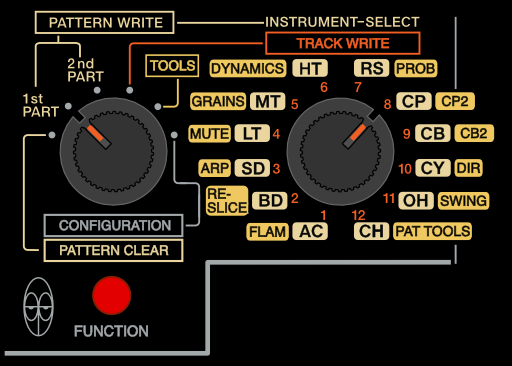
Updated control scheme
The TR-8oh8 firmware expands upon the existing features in the MANUAL PLAY page, and turns it into a complete track programming mode. This frees up two switch positions, that were originally used for track programming (PLAY and COMPOSE). In the 8oh8, these pages are now used for live effects and additional settings.
Programming patterns (PATTERN WRITE)
The control scheme of the PATTERN WRITE mode is mostly identical to the original, so users won’t have to relearn how to use the 808. We only added new features on top, such as:
- 11 additional instruments + Flam trigger selectable via the I/F VARIATION switch
- Per step and per instrument volume and probability control
- Pitch sequencing for CB2 and GRAINS instruments
- Last step and First step across parts A and B
- Live clearing of steps (TR-606 style)
Programming tracks (TRACK WRITE)
The PATTERN PLAY mode is heavily expanded and turned into a full track programming mode.
- Chain patterns from both pattern groups and in any order, with a pattern occurring multiple times in a track. Tracks can include all patterns, including the fill patterns.
- Define new tracks while the old one is still runnning
- Save these tracks as track 1-12, load them on demand
- You can also define a separate ‘fill-track’.
- Select a pattern for independent editing (editing while it is not playing)
- Copy and paste patterns
- A pattern generator with 12 different styles
Tools and effects
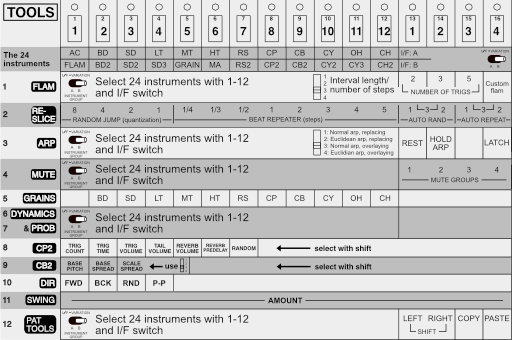
By selecting the TOOLS with the mode switch, you can access 12 different tools using the TRACK/INSTRUMENT switch:
- MUTE: Live muting of all 22 instruments + Accent + Flam Trigger. 4 Mute groups available
- RESLICE: A beat repeater and reslicer that can be used as a live effect, or put into automatic mode to constantly rearrange your rhythms
- ARP: A drum apreggiator, that works like a live sequencer for rhytms. It also features a Euclidian rhythm mode and resulting rhythms can be saved as patterns
- FLAM: A Flam and Ratchet effect can be triggered by the FLAM TRIGGER instrument and affects one or multiple instruments. This effect can be used to create subdivisions of steps as well as various kinds of tuplets, e.g. triplets or quintuplets. It is also possible to create a custom flam pattern.
- GRAINS:
- PROBABILITY: Allows you to set up 4 different probability levels for each instrument, that can then be selected per step in PATTERN WRITE mode.
- DYNAMCIS: Allows you to set up 4 different trigger levels for each instrument, that can then be selected per step in PATTERN WRITE mode.
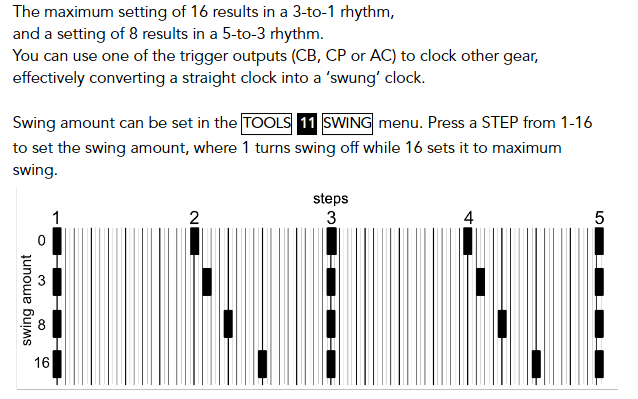
- SWING: Adjustable swing amount acting on MIDI or analog clocks
- DIRECTION: Let’s you change the sequencer play direction without losing sync.
- PAT TOOLS: A selection of tools to copy, paste, shift and modify one or multiple instrument tracks of a pattern
- CP2: Freely adjust all 7 parameters that define the CLAP 2 sound
- CB2: define the global pitch and spread of the Cowbell 2 instrument
By triggering drums at audio-rate, basslines can be synthesized. You can sequence the gate and pitch of these grains and define which combination of drum sounds are used.
Pattern generator
Generate rhythms for a complete pattern.
By holding a pattern button and pressing TAP in TRACK PROGRAMMING, a complete pattern for the currently selected pattern is generated. The INSTRUMENT SELECTOR defines the style of the rhythm: AC creates a rhythm based on the existing pattern, while BD to CH create rhythms in different styles with increasing complexity.
Saving rhythm data
The original TR-808 can only keep pattern and track data if batteries are installed. This is also the case with the TR-8oh8, but you can also manually save the patterns before turning off the machine, and they will be retained even without a battery.
Grains and grainstruments
The GRAINS tool allows you to trigger TR-808 instruments up to audio rate. This can be used to synthesize baselines or granular sound effects.
Grains can be played via MIDI with a dedicated MIDI channel, or directly sequenced on the 8oh8.
Bassdrum, Toms/Congas, and Claves/RS are very useful as basslines, the Snare is usable when the Snappy parameter is turned down. The other instruments result in less desirable sounds when triggered at audio rate, but might be interesting at lower rates.
It is possible to select multiple instruments which will all be triggered together and thus layered.
The sound can often be shaped by the TR-808 sound parameters, for example BD TONE.
Cowbell 2
Cowbell 2 is a tunable cowbell that can be sequenced internally, or played via MIDI – even duophonically.
The Cowbell consists of two oscillators, and it is possible to adjust, sequence or play via MIDI both pitch and spread.
Flam
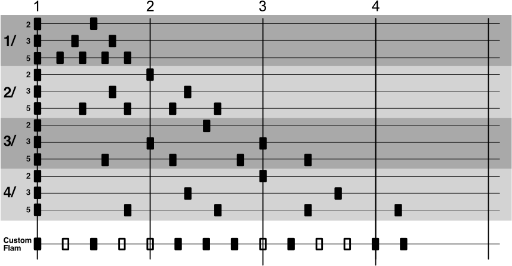
The Flam (or ratchet) effects can be used to create subdivisions of steps as well as various kinds of tuplets, e.g. triplets or quintuplets.
A dedicated flam trigger instrument let’s you sequence exactly which steps are flammed. Additionally, you can define which instruments are affected by the flam and select one of 13 flam patterns. Some are sub-divisions of a single step, some span multiple steps.
You can even define your own 16-step custom flam pattern with its own clock divder.
Reslicer
Reslicer effects can be triggered live, or run automatically to create ever lasting variations of a pattern.

Configuration menu
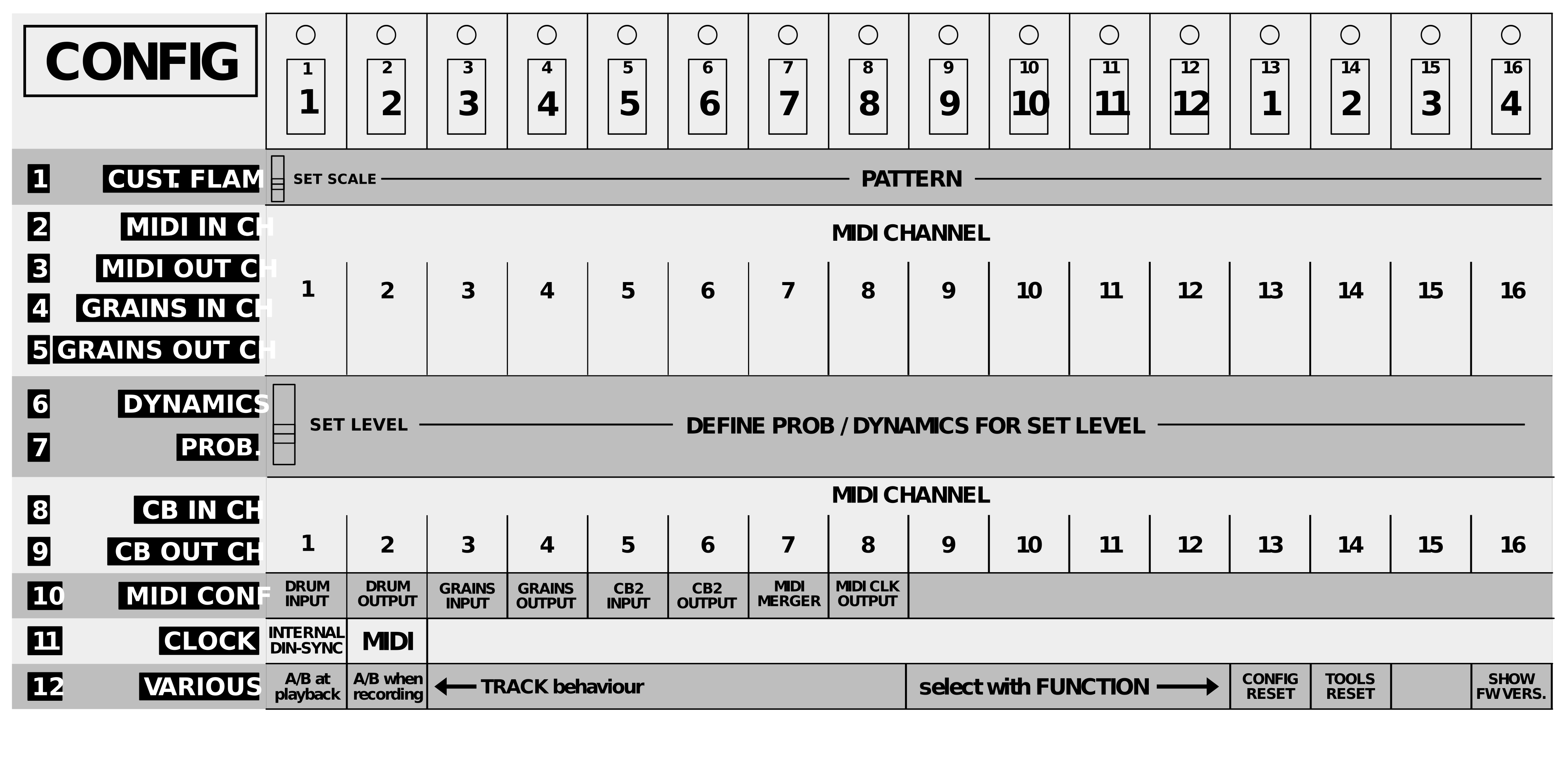
There is a built in configuration mode. Here, it is possible to define MIDI channels, select the clock source and various other settings, such as defining the custom Flam pattern, which levels are used for dyncamics and probability, turn MIDI features on and off and perform firmware resets.
User guide
A user guide is available as PDF here.
[beta version, not quite finished yet]
Installation guide
The installation is fairly simple if you know how to solder. You need to desolder the existing TR-808 CPU. Then, solder a socket (comes with the kit) in its place.
You can then plug in the TR-8oh8 CPU and solder a few wires to access the additional CPU.
Finally, you need to install MIDI – Either by using the existing DIN socket and/or by drilling holes for TRS or DIN sockets.
FAQ
Q: Will this work with a DIN-sync RE-808?
A: Yes
Q: Will this work with a modded TR-808?
A: Yes. Pretty much all these mods are analog, TR-8oh8 replaces the CPU instead.
Depending on the mod it might be harder to install TR-8oh8 because of all the cables the mod might have though
Q: I already have a Tubbutec uniPulse upgrade for my TR-808
A: You can remove it, or leave it in and use both at the same time.